Expression Syntax Helper
The Expression Syntax Helper inserts dynamic values from layer attributes into Markdown — filters, column picks, chained math, and number formatting. Use it when series or theme text should update automatically as you move between features.
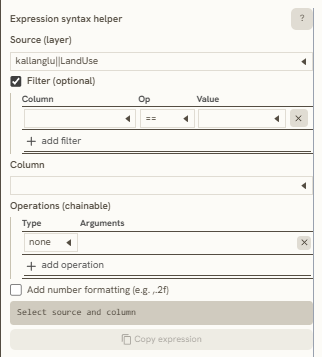
The interface contains several key sections for you to define:
A. Source (layer)
In this section, select a Layer to serve as the reference point for the information you want to display in the Markdown text editor. You can also apply an optional Filter using Column, Op (Mathematical Operations), and Value. To use this feature, first select a data attribute from the Column dropdown, specify the Value you want to use as a reference, and then apply your chosen mathematical operator (Op).
B. Column
Use this dropdown to choose which data attribute column to display as information in the Markdown text. You can also utilize Vertical Zoning & Extrusion metrics derived from geometry-generated (gg) sub-layers, such as a building's Gross Floor Area (GFA) or floor ratios within a parcel.
C. Operations (chainable)
You can also apply standard Excel-like operations (such as SUM, AVERAGE, and more) to the metrics in this column. These can be chained together sequentially to calculate and display your target numerical or non-numerical data.
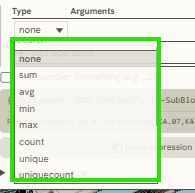
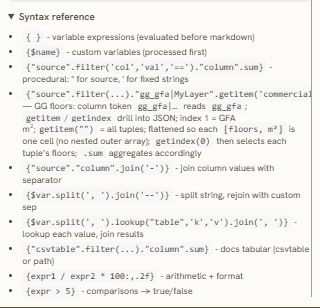
Use this reference to learn more about how each operation works.
D. Number Formatting
This tool is used to set up your decimal formatting when displaying numerical data.
E. Expression Syntax Reference
To access a general reference guide for each expression, click the "?" symbol in the top right corner of the Expression Syntax Helper bar.
Keywords
expression, syntax, helper, source, layer, column, operations, chainable, number, formatting, reference, point, filter, value, data, attribute