1 General UI
The General UI section covers the everyday map interface: how you move around the map, change basemaps, open tools, and use the left and right panels. These controls are always available to viewers and editors while a project is open.
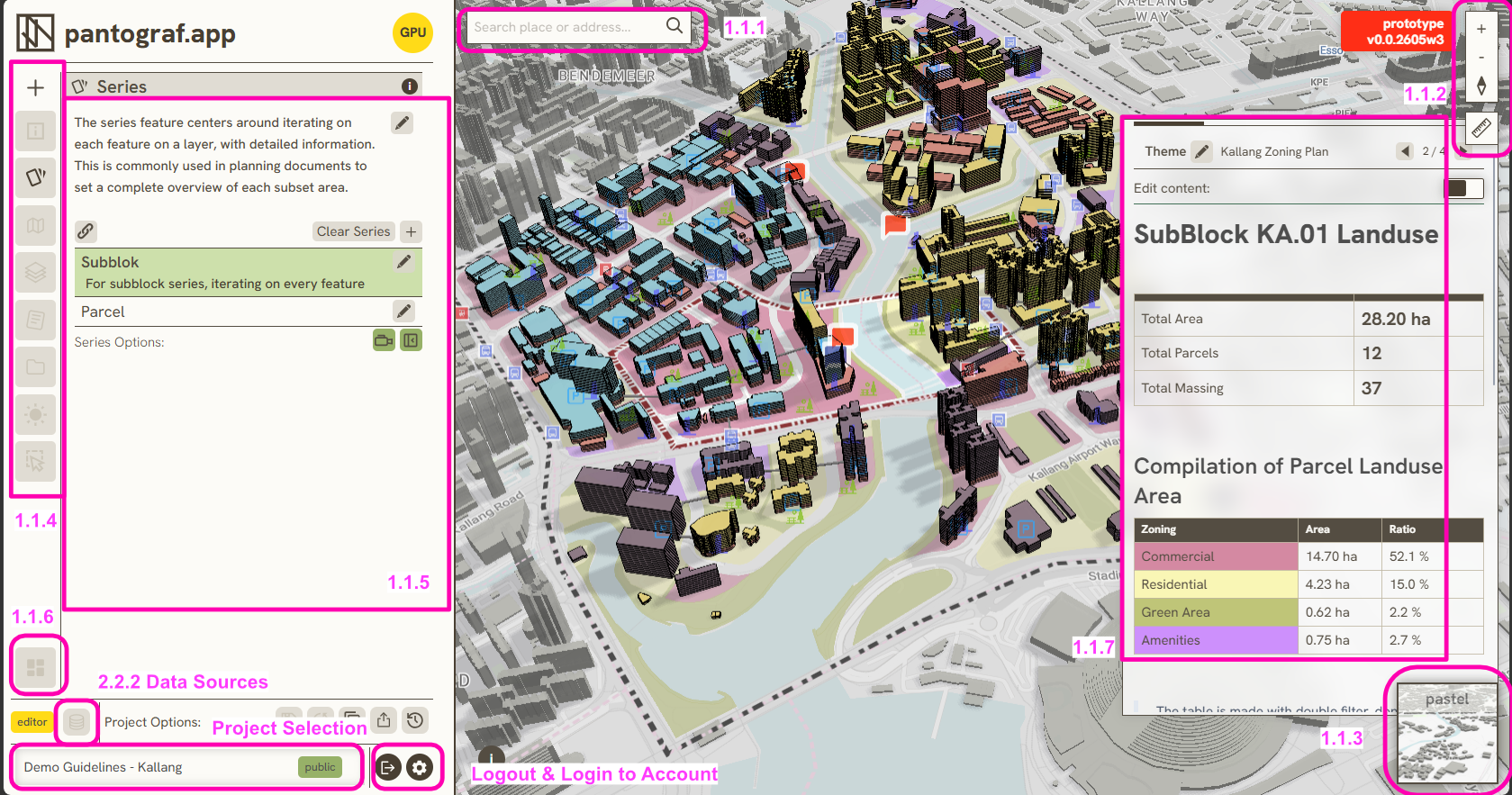
Navigation & panels
- 1.1.1 Search Bar — find a place or address and fly the map there
- 1.1.2 Map Navigation & Ruler Tool — zoom, reset north, and measure distance or area
- 1.1.3 Basemap Selection — switch the background map style
- 1.1.4 Tool Tab — choose which project tools appear on the Left Bar
- 1.1.5 Left Bar — open project tools for layers, themes, series, and more
- 1.1.6 Ribbon Toggle — quickly swap active and inactive tool sets
- 1.1.7 Island Bar (Right Bar) — floating panel for editing content and symbology
Map settings & help
- 1.2.4 Map Settings — tutorial restart, UI scale, shadow performance toggles
- Docs icon on the map navigation strip — opens docs.pantograf.app
Keywords
general, navigation, panels, settings, tutorial, docs, 1