1.1.2 Map Navigation & Ruler Tool
The Map Navigation & Ruler Tool combines camera controls with measurement. Use it to zoom in and out, reset map orientation to north, and measure distances or polygon areas directly on the map.
Following steps to use Map Navigation:
-
Click the "+" symbol to zoom-in and "-" to zoom-out
-
The compass will indicate your current orientation
-
If the compass clicked, it would reset your view to default orientation (north at the top)
Following steps to use Ruler Tool:
-
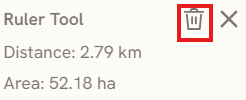
Click the Ruler icon to start the measurement
-
Place your vertices to define the measurement area or path.
-
The tool automatically calculates the Area once the vertices form a closed polygon.
-
Click the Bin icon to reset the measurement.
The navigation strip also includes a Docs icon that opens docs.pantograf.app and a Settings (gear) control — see 1.2.4 Map Settings.
Keywords
map, navigation, ruler, tool, docs, settings, following, steps, use, area, bin, 1 1 2