1.2.1 Select Area
Select Area lets you draw a polygon on the map and view its area metrics. Use it to measure a site boundary, study parcel size, or check spatial extent while planning.
Use this tool to measure an area by defining the vertices of a polygon.
Following steps to use Select Area:
-
Right Click to set your first vertex.
-
Continue clicking to place other vertices and shape the preferable polygon area.
-
View area metrics in the bottom-right corner of the screen.
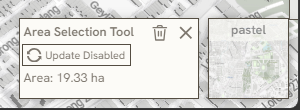
- Click Erase or Exit symbol in the bottom-right panel to close the tool.
*note: 1.2.1 Select Area & 2.1.5 Memo only available to editors or collaborators
Keywords
select, area, following, steps, use, right, click, continue, clicking, view, metrics, erase, exit, symbol, 1 2 1