2.2.4 Basemap Editor
Basemap Editor lets staff edit shared basemap styles — sources, layers, and paint properties — that appear in 1.1.3 Basemap Selection across projects. Changes in the Local section affect how background maps render under project data.
A. Local
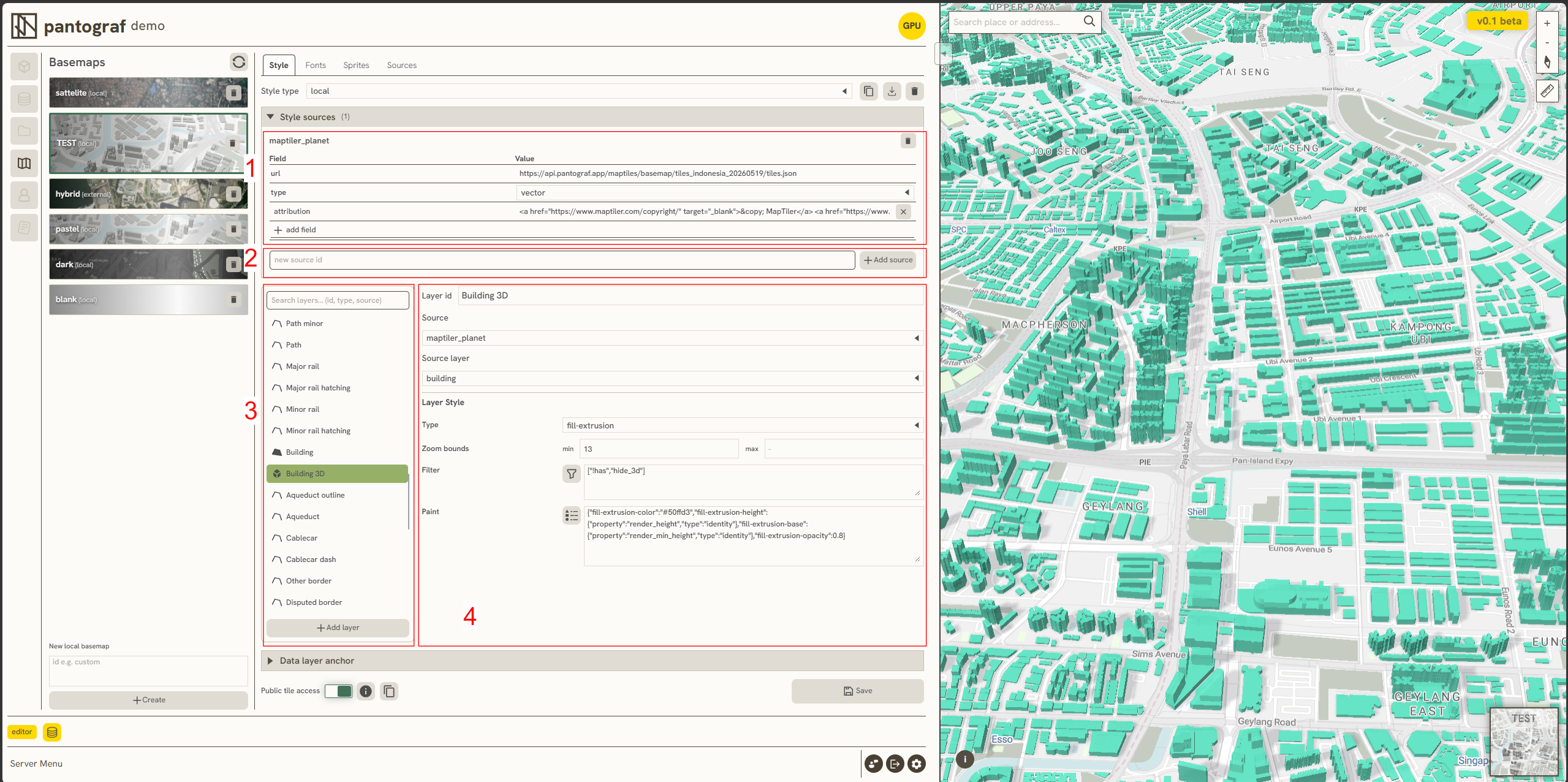
The Local section within the Style settings contains several key components designed to manage data inputs, sources, and visual layer properties:
-
Source Settings: Used to configure foundational layer parameters, including data attribution, the data URL (generated by Pantograf), and the format type (such as Vector, Raster, GeoJSON, Image, or Video).
-
Add Source: Enables the manual insertion of new, specific data sources directly into the Local environment.
-
Layer List: Displays all available layers within the web (available for all projects).
-
Layer Editing: Provides styling and rendering controls, operating identically to the layer painting utilities found in 2.3.1 Layer Symbology.
Here’s a quick example of how to tweak a specific basemap style, like changing the color of extruded 3D buildings:
Keywords
basemap, editor, local, source, settings, add, layer, list, editing, 2 2 4